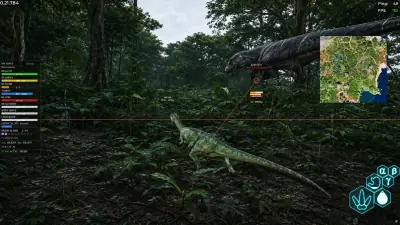
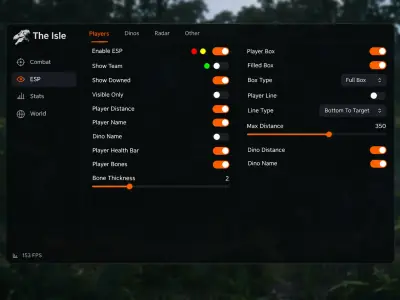
Dinosaur ESP
Read beyond the foliage.
Locate dinosaurs through terrain and foliage with species, health, distance, weight, growth and skeleton information.
- Species and growth
- Health, weight and distance
- Skeleton overlays
Read the island with dinosaur ESP, map nearby activity on radar and adjust Bite Assist to your preferences. Explore our EVRIMA toolkit and choose an access plan that fits your setup.

EVRIMA
EVRIMA only
Windows
10 / 11 · 64-bit
31
days of monthly access
Cloud DMA
Check requirements
Features
Our toolkit brings dinosaur information, resource markers and configurable assistance into one feature set for The Isle on Steam.
Read beyond the foliage.
Locate dinosaurs through terrain and foliage with species, health, distance, weight, growth and skeleton information.
A different view of nearby activity.
Keep nearby dinosaurs, nests and carcasses together on a 2D overlay.
Adjust how assistance behaves.
Customize smoothness, targeting range, bone priority and movement prediction with species-specific profiles.
Explore a local look.
Preview dinosaur skins and patterns locally, save favorites and export loadouts.
Bring world resources into view.
Highlight food, water, herbs, fruits and nests with distance markers.
Review your recording setup.
Overlay hiding options are listed for OBS and Xbox Game Bar. Test the capture result; this is not an anti-cheat protection claim.
Keep your settings together.
Save settings and presets in cloud storage for a configuration you can return to.
Confirm what your edition includes.
Auto Finish, Auto Stamina and carcass assistance depend on the edition. Confirm inclusion before payment.
Give your controls context.
Use species-specific profiles alongside the listed Bite Assist settings. A profile is not a promise of a combat outcome.
Store
Compare our EVRIMA toolkit with three separately licensed utilities. Match the feature scope and requirements to your goal before checkout.
Dinosaur ESP, radar, resource markers and adjustable Bite Assist for EVRIMA
Explore the island with our dinosaur and resource overlays, customize Bite Assist and keep saved presets together. Monthly access is $35 for 31 days; lifetime is $150.
From $35 / month
Refresh the identifiers tied to your PC.
Our HWID Spoofer rewrites disk serials, MAC addresses, GPU IDs and related fingerprints, with trace cleanup included. An account sanction remains separate.
From $50 / month
Give your appeal a repeatable structure.
Our UGC service combines appeal templates with automated dispute steps for restricted gaming, social and marketplace profiles. You organize the case; the platform decides the outcome.
From $35 / month
Make the preview your own.
Explore our library of weapon finishes, outfits and knife variants in supported titles. The lightweight client draws cosmetics locally without purchasing each item separately.
From $35 / month
Why us
Compare our listed overlays and configuration tools with a session without these tools. Functionality and detection status have not been independently verified.
Dinosaur ESP
Locate dinosaurs through terrain and foliage with species, health, distance, weight, growth and skeleton information.
2D radar
Keep nearby dinosaurs, nests and carcasses together on a 2D overlay.
Bite Assist
Customize smoothness, targeting range, bone priority and movement prediction with species-specific profiles.
Appearance Changer
Preview dinosaur skins and patterns locally, save favorites and export loadouts.
Resource ESP
Highlight food, water, herbs, fruits and nests with distance markers.
Cloud configurations
Save settings and presets in cloud storage for a configuration you can return to.
EVRIMA
EVRIMA only
The Isle on Steam: EVRIMA only. Legacy is not supported by the current listing.
31
Monthly or lifetime
Choose $35 for 31 days or $150 for lifetime access. Confirm the exact edition, lifetime conditions and any hardware purchases before payment.
4
Choose the right tool
Compare our EVRIMA toolkit with three separately licensed utilities. Match the feature scope and requirements to your goal before checkout.
Setup guide
The Isle on Steam: EVRIMA only. Legacy is not supported by the current listing. Windows 10 or 11, 64-bit. HVCI and Core Isolation enabled. TPM and Secure Boot enabled. Cloud DMA required for full functionality. Confirm the exact setup before purchase.
Check your setup
Choose your plan
Use the current instructions
How it works
Check your EVRIMA build and complete hardware setup before checkout. Auto Finish, Auto Stamina and carcass assistance depend on edition; confirm which are included.
4 easy steps
Check your setup
Confirm EVRIMA, 64-bit Windows 10/11 and every listed security and Cloud DMA requirement.
Choose your plan
Review the edition and select monthly or lifetime access. Keep the order details.
Use the current instructions
Follow the supplied setup guidance and confirm current compatibility before launching.
Keep a useful configuration
Save your settings and presets. Recheck compatibility after a game update.
Blog
Explore feature explanations, EVRIMA compatibility, setup requirements and license comparisons.
Understand dinosaur labels, world-space ESP and the 2D radar before choosing your display settings.
Our current listing supports EVRIMA only. Learn why Legacy and server presets require separate checks.
Check Windows, security settings and the Cloud DMA requirement before selecting a license.
FAQ
Answers for this page. The FAQ page holds the rest.